






























































 AI Tools in After Effects
1 day
In centre:
£please call
Live online:
£please call
Key details
Adobe After Effects utilises AI and machine learning to automate tedious compositing and animation tasks.
This course is ideal for existing After Effects users who want to make full use of the latest AI features available. Sessions include:
- Content-Aware Fill: Analyse frames to identify and remove key objects, shadows or blemishes in moving footage, blending in pixels to fill the void.
- AI Roto Brush: Use advanced machine learning to isolate subjects, hair and limbs in video clips, eliminating the need for tedious, frame-by-frame tracing.
- Environment Lighting: Use AI-assisted material mapping and shadow controls.
AI Tools in After Effects training is arranged on-request, i.e. one-to-one training or a ‘closed course’ for your group. Your training can be tailored to take into account any existing knowledge you have, and the work you’re going to be doing.
In-class or online
This course is available in-class at eight centres or live online.
Expert trainers
AI Tools in After Effects courses are hosted by an Adobe After Effects expert. See Expert trainers.
How will I learn?
Training combines lecture, demonstration and hands-on practice.
Practical exercises provide activity-based experience. These exercises can be tailored to deal with issues specific to your business. You have ample opportunity to discuss specific requirements with the trainer.
Training guide and certificate
Course delegates receive:
- A practical training guide, to refer to during the course and use as a refresher after. Choose from a printed guide or PDF.
- An e-certificate confirming successful completion of an AI Tools in After Effects training course.
After course support
Following AI Tools in After Effects training, delegates are entitled to 30 days’ email support from their trainer to help with any post-course issues. For further details, see Support.
Prerequisites
Delegates should be familiar with the fundamentals of After Effects, including techniques for animation, layer control, and working with shapes, effects and type.
General information
Payment
Payment for AI Tools in After Effects training can be made by:
- Bank transfer. Please call 01527 834783 for our bank details.
- Card. Visa, Mastercard and American Express cards accepted. Payment can be made securely online or over the phone. Armada doesn’t record or store your card details.
- Buy now pay later. Available for private bookings; pay in 4 x interest-free fortnightly instalments. Facility provided by Clearpay. For details, see Clearpay terms of service.
Purchase orders
We accept purchase orders from UK registered companies with turnover in excess of £1m, and public sector organisations
Accommodation
See Accommodation local to our training centres.
Cancellations and postponements
If an on-request AI Tools in After Effects course booking is cancelled giving less than 20 working days’ notice, a cancellation fee is payable. View cancellation terms.
If an on-request AI Tools in After Effects course booking is postponed giving less than 20 working days’ notice, a postponement fee is payable. View postponement terms.
Terms and conditions
Expert trainers
Marek Mularczyk

Marek is an Adobe Design, Video and Motion Specialist, and an Adobe Certified Instructor (ACI).
He has specialist knowledge of the key Adobe Creative applications: InDesign, Photoshop, Illustrator, After Effects and Premiere, as well as Adobe Express and Firefly.
Voted as one of top 10 Adobe Certified Instructors in the world, Marek has over 15 years’ experience as an animator and photo/video editor, and has published numerous books on these topics.
As an instructor, Marek has trained a wide range of blue-chip clients including Lloyds, Barclays, HS2, Lululemon, Asos, Boohoo, Sony, Samsung, and many more.
Prior to focusing on training, Marek worked as a professional photographer for over 12 years. Photography remains his passion, and in his spare time he travels Europe in search of that perfect picture.
Live online training
Live online training lets you participate in a course from your place of work or home.
We do everything possible to make your online training experience as close as possible to actually being in the classroom. You can:
- See and hear our trainer, and the other delegates participating in the course…
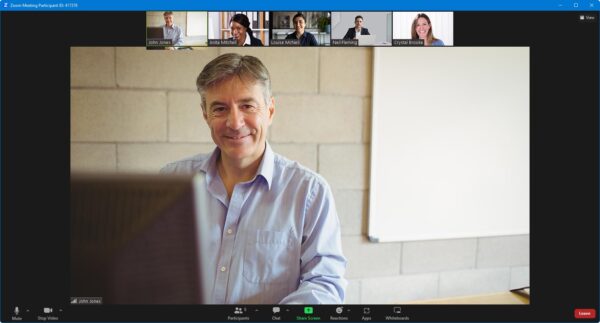
- Interact by speaking, using chat, or raising your ‘virtual hand’ if you need assistance.
- Share your screen with our trainer, and allow them to take control to explain something.
Like our in-class courses, online courses…
- Are presented by expert instructors.
- Give you plenty of opportunity to carry out assisted, practical exercises.
- Offer 30 days’ email support from your trainer.
All you need is an Internet-connected computer with a webcam and audio capability. We provide everything else…
- Links to download the files, resources, etc. you’ll use in your course.
- A training guide. For most courses, you can choose from a printed copy that we post to you, or a PDF.
In the week before your course, we’ll send you an email containing everything you need to prepare for and participate in the training. We’re available in the days ahead of your course to assist if you need any help.
Please note that we are not able to record scheduled online courses for privacy reasons.
When you attend live online training, you’re participating in a real course, hosted by a real trainer, in real time